Agent 工具搜索的直观解释

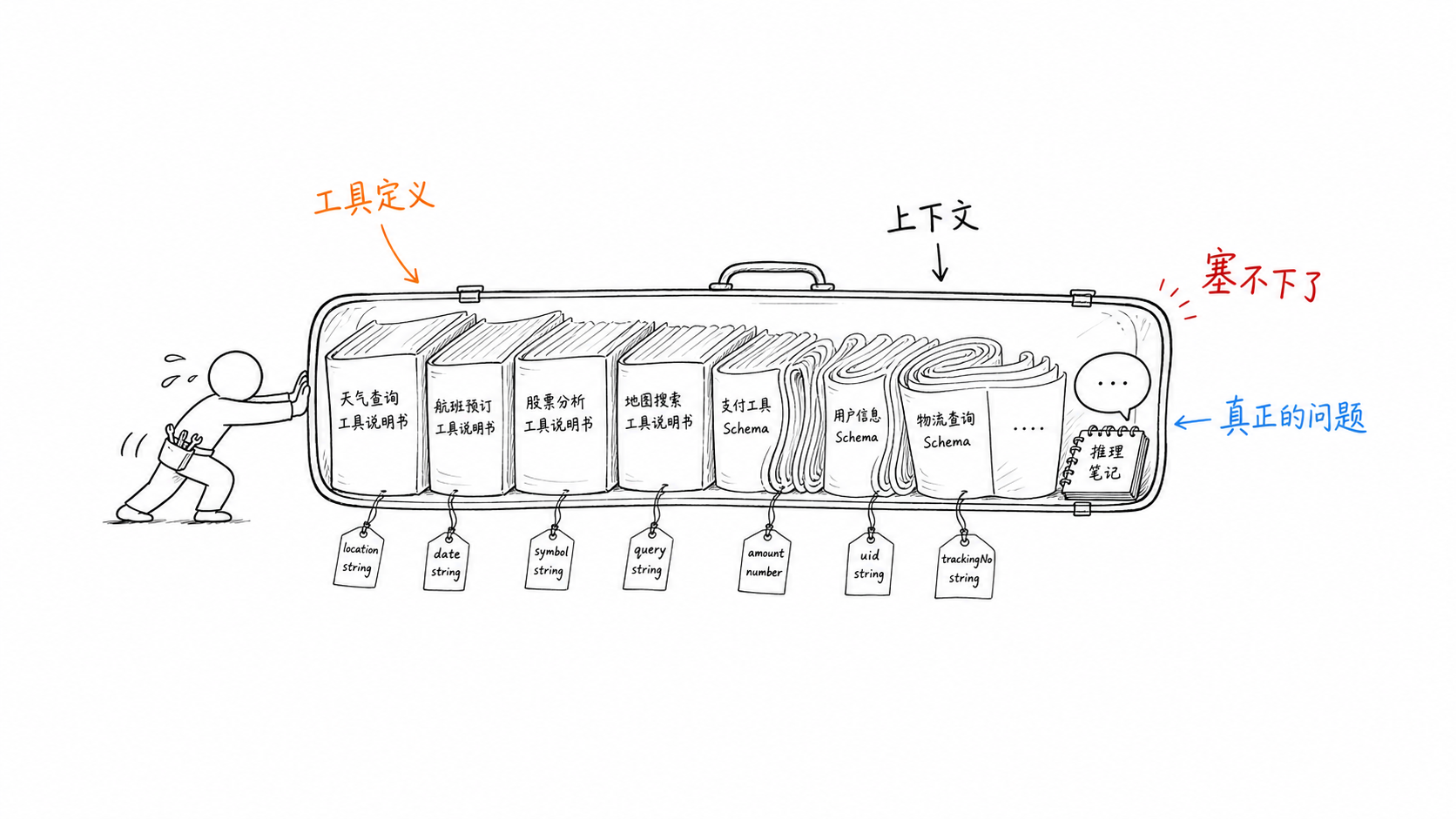
随着 LLM 泛化能力的提升和 Agent 工具的膨胀,特别是对 MCP 服务的接入支持后,有限上下文窗口中 Tool Schema 定义所占用的比例也越来越大,比如在 Hermes 中,一个 terminal_tool 工具的完整 Schema 如下:

1
2
3
4
5
6
7
8
9
10
11
12
13
14
15
16
17
18
19
20
21
22
23
24
25
26
27
28
29
30
31
32
33
34
35
36
37
38
39
40
41
42
43
44
45
46
47
48
49
50
51
52
53
54
55
56
57
58
59
60
61
62
63
64
65
66
67
# Tool description for LLM
TERMINAL_TOOL_DESCRIPTION = """Execute shell commands on a Linux environment. Filesystem, current working directory, and exported environment variables persist between calls.

Do NOT use cat/head/tail to read files — use read_file instead.
Do NOT use grep/rg/find to search — use search_files instead.
Do NOT use ls to list directories — use search_files(target='files') instead.
Do NOT use sed/awk to edit files — use patch instead.
Do NOT use echo/cat heredoc to create files — use write_file instead.
Reserve terminal for: builds, installs, git, processes, scripts, network, package managers, and anything that needs a shell.
Because exported environment state persists, activate a virtualenv or export setup variables once per session; do not re-source the same environment before every command unless a command proves the shell state was reset.

Foreground (default): Commands return INSTANTLY when done, even if the timeout is high. Set timeout=300 for long builds/scripts — you'll still get the result in seconds if it's fast. Prefer foreground for short commands.
Background: Set background=true to get a session_id. Almost always pair with notify_on_complete=true — bg without notify runs SILENTLY and you have no way to learn it finished short of calling process(action='poll') yourself. Two legitimate uses:
(1) Long-lived processes that never exit (servers, watchers, daemons) — silent is correct, there's no exit to notify on.
(2) Long-running bounded tasks (tests, builds, deploys, CI pollers, batch jobs) — MUST set notify_on_complete=true. Without it you'll either forget to poll or sit blocked waiting for the user to surface the result.
For servers/watchers, do NOT use shell-level background wrappers (nohup/disown/setsid/trailing '&') in foreground mode. Use background=true so Hermes can track lifecycle and output.
After starting a server, verify readiness with a health check or log signal, then run tests in a separate terminal() call. Avoid blind sleep loops.
Use process(action="poll") for progress checks, process(action="wait") to block until done.
Working directory: Use 'workdir' for per-command cwd.
PTY mode: Set pty=true for interactive CLI tools (Codex, Claude Code, Python REPL).

Do NOT use vim/nano/interactive tools without pty=true — they hang without a pseudo-terminal. Pipe git output to cat if it might page.
"""

TERMINAL_SCHEMA = {
"name": "terminal",
"description": TERMINAL_TOOL_DESCRIPTION,
"parameters": {
"type": "object",
"properties": {
"command": {
"type": "string",
"description": "The command to execute on the VM"
},
"background": {
"type": "boolean",
"description": "Run the command in the background. Almost always pair with notify_on_complete=true — without it, the process runs silently and you'll have no way to learn it finished short of calling process(action='poll') yourself (easy to forget, leading to silent blindness on long jobs). Two legitimate patterns: (1) Long-lived processes that never exit (servers, watchers, daemons) — these stay silent because there's no exit to notify on. (2) Long-running bounded tasks (tests, builds, deploys, CI pollers, batch jobs) — these MUST set notify_on_complete=true. For short commands, prefer foreground with a generous timeout instead.",
"default": False
},
"timeout": {
"type": "integer",
"description": f"Max seconds to wait (default: 180, foreground max: {FOREGROUND_MAX_TIMEOUT}). Returns INSTANTLY when command finishes — set high for long tasks, you won't wait unnecessarily. Foreground timeout above {FOREGROUND_MAX_TIMEOUT}s is rejected; use background=true for longer commands.",
"minimum": 1
},
"workdir": {
"type": "string",
"description": "Working directory for this command (absolute path). Defaults to the session working directory."
},
"pty": {
"type": "boolean",
"description": "Run in pseudo-terminal (PTY) mode for interactive CLI tools like Codex, Claude Code, or Python REPL. Only works with local and SSH backends. Default: false.",
"default": False
},
"notify_on_complete": {
"type": "boolean",
"description": "When true (and background=true), you'll be automatically notified exactly once when the process finishes. **This is the right choice for almost every long-running task** — tests, builds, deployments, multi-item batch jobs, anything that takes over a minute and has a defined end. Use this and keep working on other things; the system notifies you on exit. MUTUALLY EXCLUSIVE with watch_patterns — when both are set, watch_patterns is dropped.",
"default": False
},
"watch_patterns": {
"type": "array",
"items": {"type": "string"},
"description": "Strings to watch for in background process output. HARD RATE LIMIT: at most 1 notification per 15 seconds per process — matches arriving inside the cooldown are dropped. After 3 consecutive 15-second windows with dropped matches, watch_patterns is automatically disabled for that process and promoted to notify_on_complete behavior (one notification on exit, no more mid-process spam). USE ONLY for truly rare, one-shot mid-process signals on LONG-LIVED processes that will never exit on their own — e.g. ['Application startup complete'] on a server so you know when to hit its endpoint, or ['migration done'] on a daemon. DO NOT use for: (1) end-of-run markers like 'DONE'/'PASS' — use notify_on_complete instead; (2) error patterns like 'ERROR'/'Traceback' in loops or multi-item batch jobs — they fire on every iteration and you'll hit the strike limit fast; (3) anything you'd ever combine with notify_on_complete. When in doubt, choose notify_on_complete. MUTUALLY EXCLUSIVE with notify_on_complete — set one, not both."
}
},
"required": ["command"]
}
}

这样的工具多了之后,如果一次性注入上下文中,则很容易导致上下文膨胀而影响输出质量,同时过多的工具选择也会减少输出置信度。

若要理解 Tool Search 的话,需要先理解 token 的流动方式。

Agent -> 模型网关 -> 推理服务

LLM API 一般指模型渠道商提供的一个地址,常见的像是 https://dashscope.aliyuncs.com/compatible-mode/v1,负责将 Agent 连接到模型服务提供方,即模型网关。其中的 compatible-mode 是从 Chat Bot 时代延续下来的接口协议,设计之初是为了和 LLM 对话聊天等通用场景交互使用的。

在 OpenAI Response API 和 Anthropic Messsage API 等比较新的主流模型 API 协议中,都针对通用 Agent 能力重新设计了 API,将工具作为一等公民使用。其中针对工具搜索相关设计,使用的是 defer_loading 参数作为控制,语义表示工具延迟加载,比如 claude 中一个简单的天气工具定义如下:

1
2
3
4
5
6
7
8
9
10
11
12
13
{
"name": "get_weather",
"description": "Get current weather for a location",
"input_schema": {
"type": "object",
"properties": {
"location": { "type": "string" },
"unit": { "type": "string", "enum": ["celsius", "fahrenheit"] }
},
"required": ["location"]
},
"defer_loading": true
}

延迟加载是指这类工具(的完整定义)不会立即被加载到上下文中,而是在模型发现需要工具调用能力时,通过 tool_search 工具搜索工具来动态发现需要的工具。
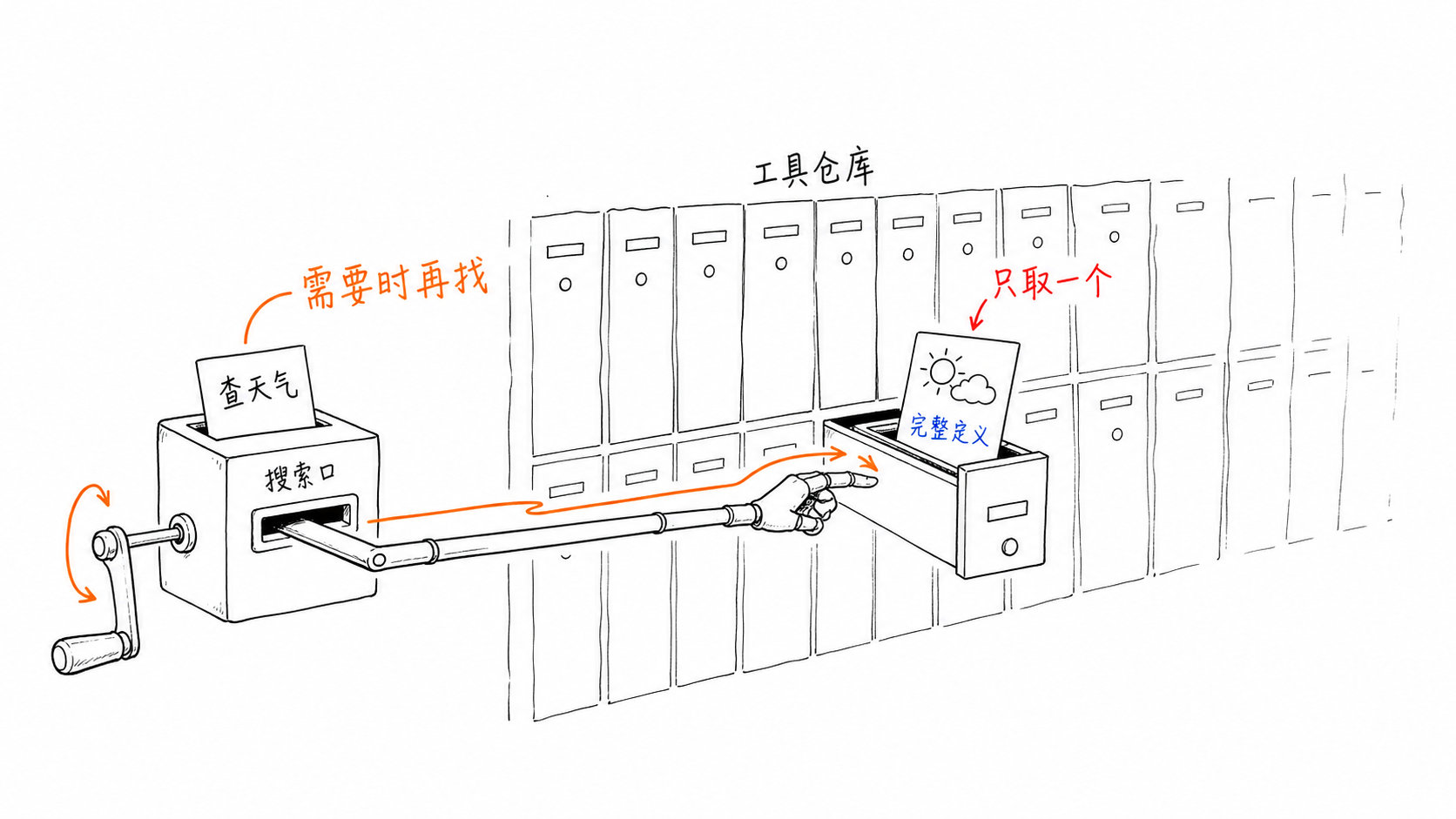
从 Agent 视角的流程语义如下:

  1. 我需要工具查询天气
  2. 使用工具搜索工具(tool_search_tool_*
  3. 拿到工具搜索结果 get_weather
  4. 带参数调用 get_weather
  5. 获取天气工具返回

以上工具搜索流程依赖的是服务端的工具搜索能力,即 tool_search 在 Anthropic/OpenAI 等模型服务提供商的服务器上对工具进行检索筛选后进入模型上下文(也支持客户端自行实现工具搜索)。

但是对于 Chat Completions 协议的主流接口,模型服务提供商一般都不会提供工具搜索等服务端实现的功能,而依赖客户端自己实现。

一个常见的 /v1/chat/completions 请求格式如下:

1
2
3
4
5
6
7
8
{
"model": "...",
"messages": [
{"role": "system", "content": "..."},
{"role": "user", "content": "..."}
],
"tools": [...]
}

工具定义放在单独的工具数组中。理论上,客户端可以简单动态修改工具数组来控制模型的工具可见性。

Yes, But… 这里涉及到模型服务提示缓存命中的问题——主流模型服务端在将 API 转换为模型输入的过程中,会遵循以下序列(实际由模型的提示模板决定):

1
2
3
4
[工具定义]
[系统/用户提示]
[历史消息]
[本轮消息]

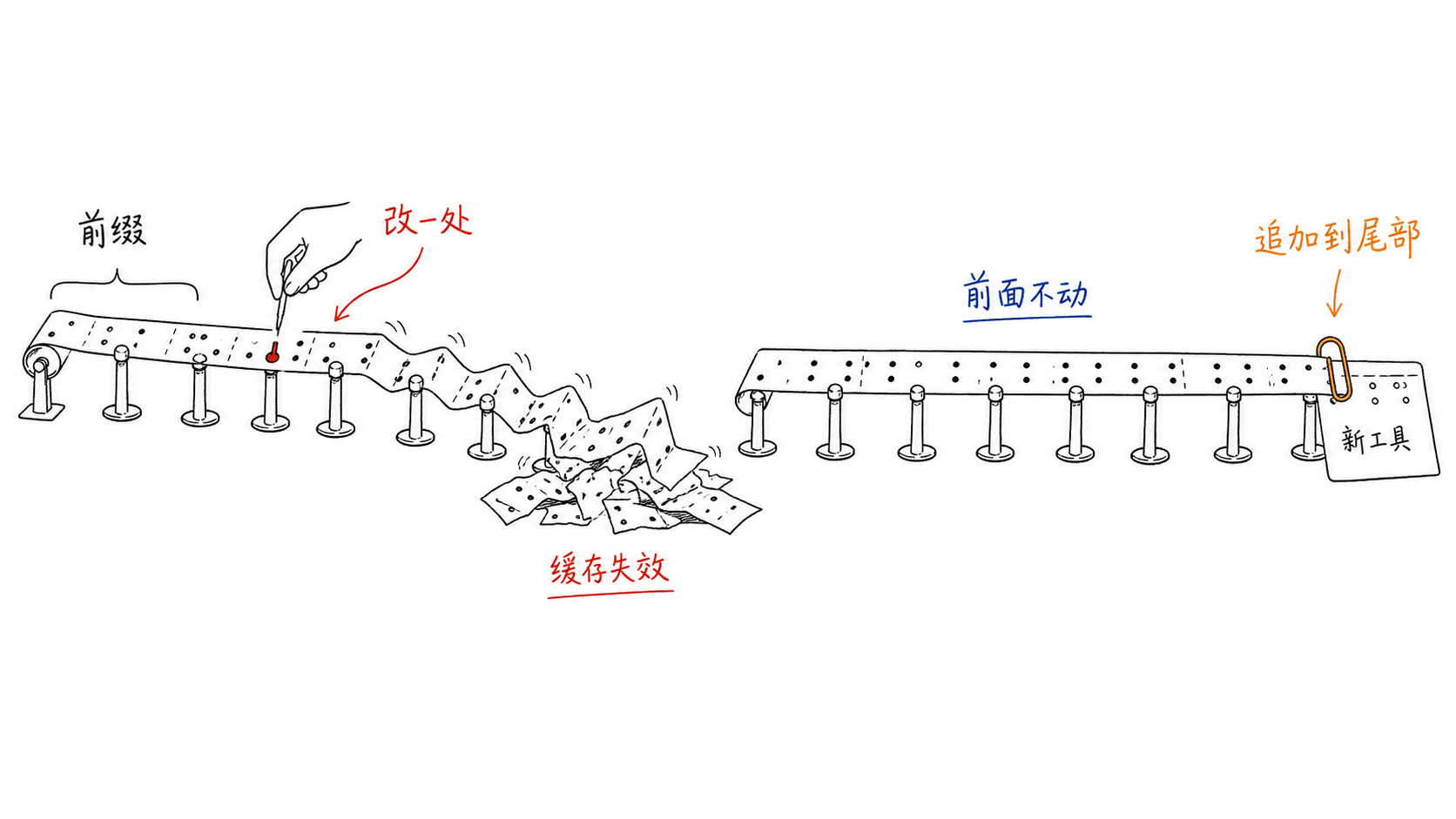
提示缓存设计本身十分“脆弱”,命中要求输入前缀序列相同,也就意味着工具定义部分不可轻易修改,修改一个工具数组中的 token 也会导致之后内容的缓存全部失效。
OpenAI 在工具搜索的说明中也明确了这一点:

工具搜索使模型能够根据需要动态地查找并加载工具到模型的上下文中。这样可以避免将所有工具的定义预先加载到模型的上下文中,从而有助于降低总的 token 使用量和成本。为了实现最优的成本与延迟,工具搜索设计为保留模型的缓存。当模型发现新的工具时,这些工具会被插入到上下文窗口的末尾。

PI Agent 最近的一篇文章也解释了针对提示缓存设计的重要性。

对于缓存利用的需求和协议层面的妥协,意味着开源 Agent 需要实现客户端侧的工具搜索来控制上下文序列,从而模拟工具定义的渐进式加载过程。

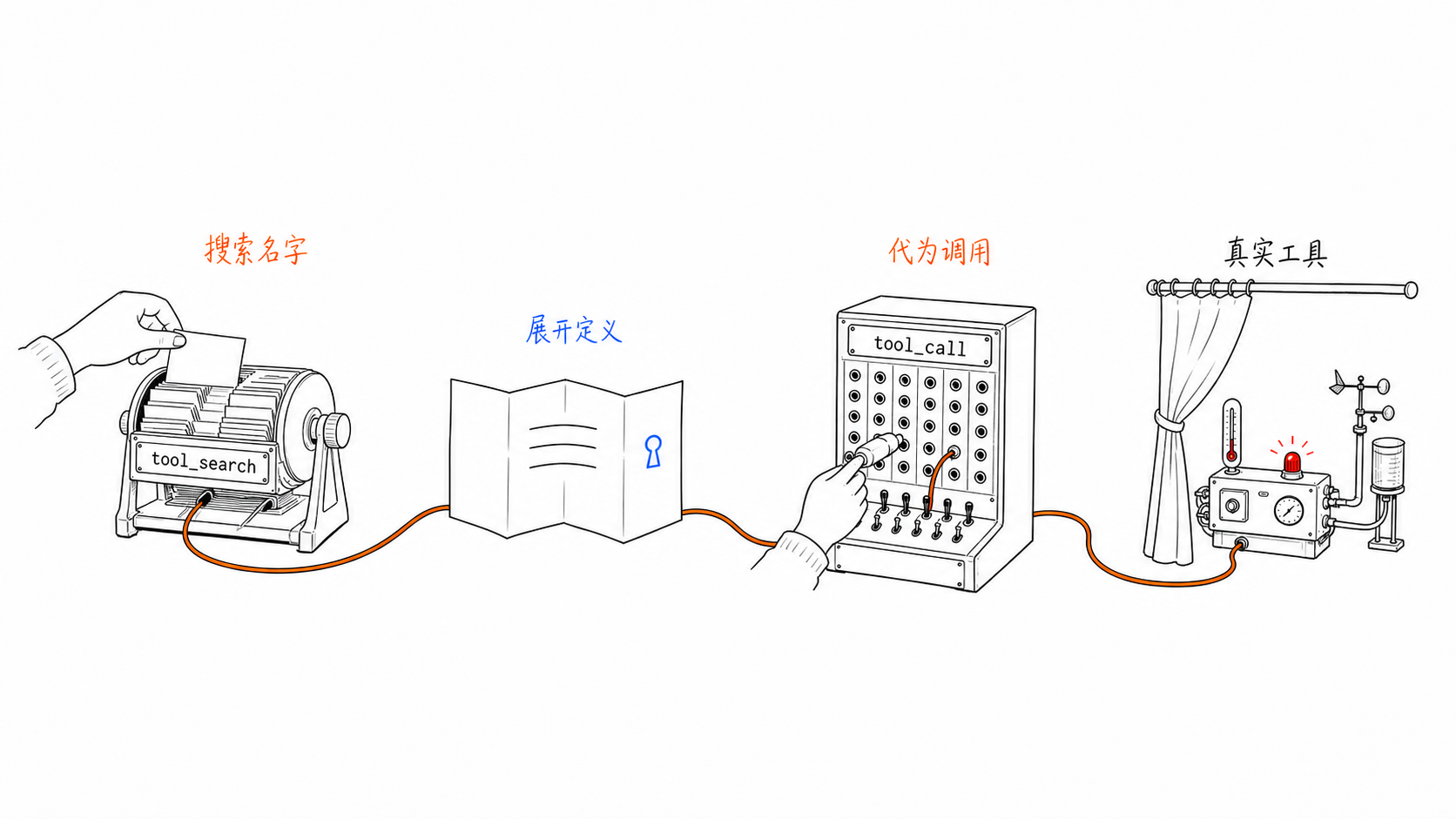
以 Hermes 为例, 定义了三种工具来实现延迟加载:

1
2
3
tool_search(query, limit?) — 搜索延迟加载工具目录
tool_describe(name) — 获取工具完整定义
tool_call(name, arguments) — 调用工具

这种情况下,模型在工具数组中是看不到 MCP 等工具定义的,只有当触发调用 tool_search -> tool_describe 的过程后,才会使用 tool_call 工具在客户端解包调用真实工具。每次工具搜索到调用的完整过程都会作用在上下文的尾部而不进入工具数组,从而避免缓存失效。
Tool Search 的工作原理

Claude 提供了两种工具搜索模式:

  • 构建正则表达式来查找工具
  • 使用 BM25 通过自然语言来检索工具

其中前者很好理解,主要解决的是检索命中问题,而后者解决的则是相关度排序问题。

什么是 BM25

如何在大量文档(工具说明)中排序查询词(工具调用)的相关性?

最简单的判断维度是词频(TF,Term Frequency),查询词在文档中出现的频次越高,越说明文档相关。

但是对于很多助词,比如 the 等,在文档中的词频往往都很高而导致很容易影响检索。这时就需要考虑逆文档频率(IDF,Inverse Document Frequency),即如果一个词到处都存在,则意味着它的信息量很低,应当减小它在检索中的权重。

TF-IDF 就是以上两点基本思路的结合,可以理解为“查询词如果在目标文档中经常出现,但是在所有文档中很少见,则意味着其和当前文档更相关“。所以 TF-IDF 常被用于检索,比较常见的场景是网页搜索,用于确定网页和查询的相关性。

简单理解的话,$\text{TF-IDF}=\text{词频}\times\text{词的稀有程度}$。

BM25(Best Matching 25,其中数字仅代表编号),则是继承了 TF-IDF 核心思想的一种算法,主要解决两个问题:

  • 词频(TF)在相关性计算中,带来的权重影响很容易线性增加。比如 0-1 的从无到有可能对相关性判断很有价值,但是 50-100 的情况下并不意味着相关性具备数值上的明显差异。所以需要减弱词频增加的收益。
  • 长文档更容易获得词频分数,所以需要对所有文档长度做归一化。

从直觉理解公式组成的话:

$\operatorname{score}(D,Q)=\sum_{q\in Q}\underbrace{\operatorname{IDF}(q)}_{\text{词有多稀有}}\times\underbrace{\frac{f(q,D)(k_1+1)}{f(q,D)+k_1\left(1-b+b\frac{|D|}{\operatorname{avgdl}}\right)}}_{\text{出现次数贡献,并按文档长度修正}}$

用一句最简单、最直白、最不绕弯的话说,$\text{BM25}=\text{稀有程度}\times\text{出现频率贡献}\times\text{长度修正}$。
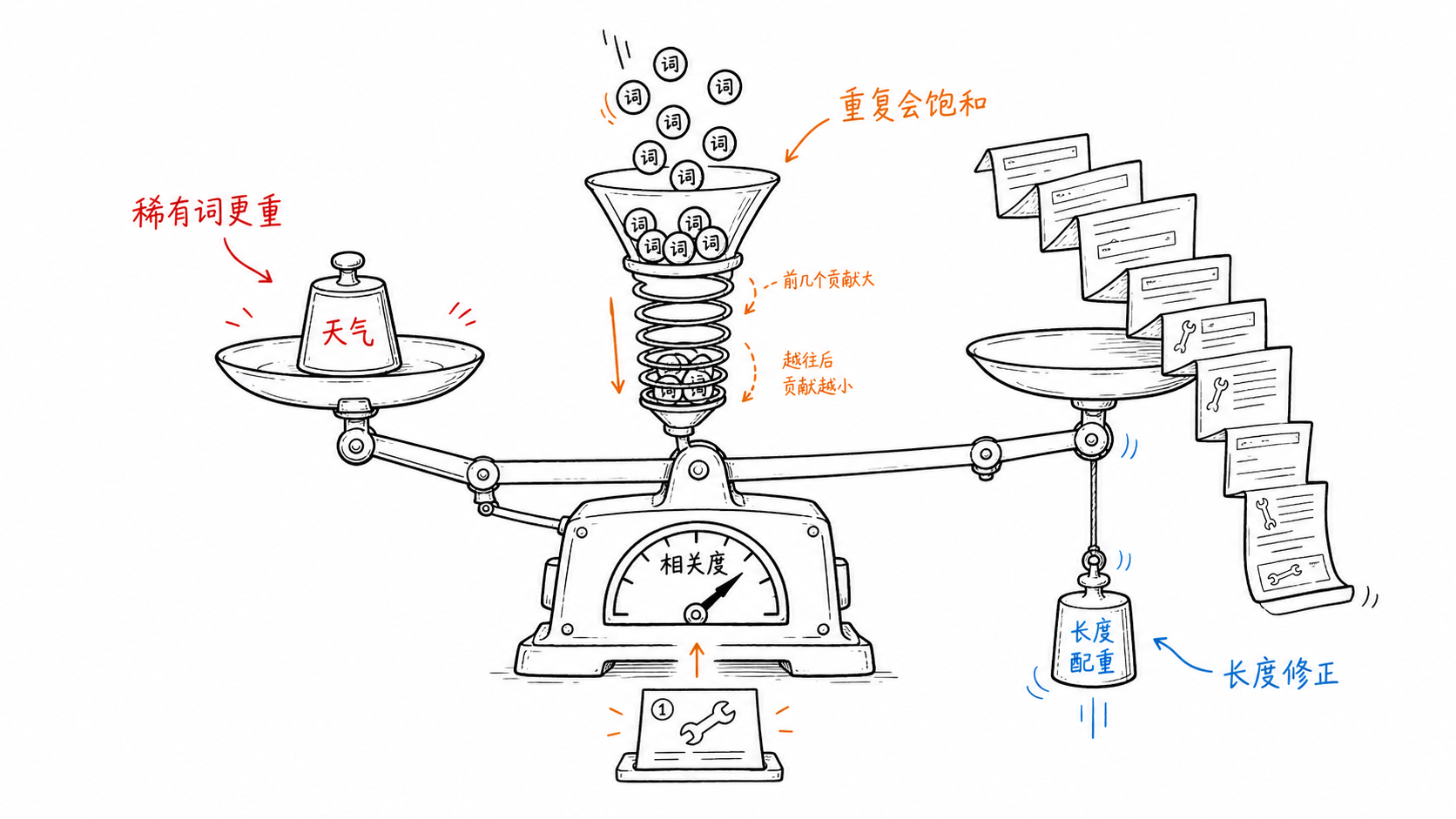
附带由 gpt 提供的可视化理解:

分词结果
deferred tools 的 BM25 排名

索引字段:工具名称 + 工具描述 + 参数名称

分词问题

值得一提的是,BM25 依赖精准匹配,并没有语义检索能力。对于一句“查询北京天气”的意图描述,进入检索之前还需先进行分词,理想情况下应该拆为查询北京天气三个词分别进行搜索。由于英文天然适合(通过空格等符号)简单分词,Hermes 中也采用了仅对英文检索做分词处理的轻量实现,而中文场景则没有支持。

如果以检索效果为目标的话,添加 Embedding 用于语义检索可以根本解决,但这会引入额外依赖,且对于工具检索这个功能来说有点重。引入中文分词则是一个妥协的中间方案,主流实践中也会考虑混合模式来保证更好的召回率。

参考